Overview
The instructions below are intended to help new users set up a small starter system. They do not cover all aspects of systems installation and configuration. It is recommended that users start with a small setup in order to become familiar with the system and its settings before progressing to larger installations.
This guide assumes that the user has the following:
- 6 or more Anchors
- 2 or more Tags
- Anchor mounting hardware appropriate for the installation location
- Ethernet cables of appropriate lengths
- PoE switch
- A Host PC for the CUWB Manager Package
For first-time users, it is recommended to use tripods for the initial installation to avoid making permanent modifications to the building infrastructure.
Preparation
Successful operation of any CUWB system takes careful setup and planning. It may be helpful to have these other documents available:
| Document | Description |
|---|---|
| Installation Guide | Detailed information regarding CUWB Hardware Installation |
| CUWB Manager Manual | Specific settings, page, and system descriptions |
| System Architecture Overview | Describes overall CUWB System Architecture and Integration |
| Deployment Considerations | Detailed overview of system level considerations necessary to operate a UWB RTLS |
Background
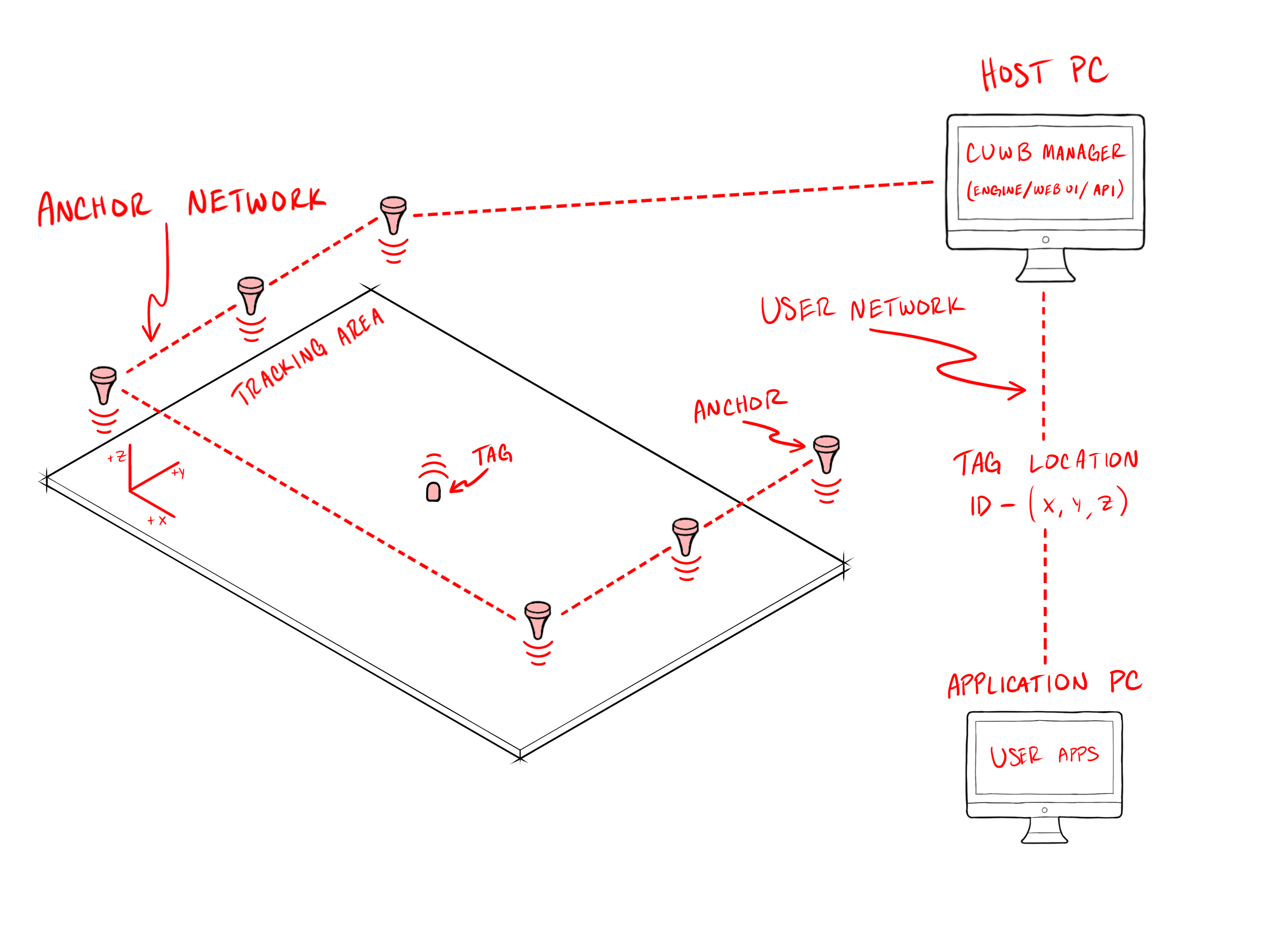
The image above displays a simplified view of a CUWB System. The System is made up of a tracking area, an Anchor network, a Host PC, and a User network. Tags beacon data over UWB, based on the Operational Mode, out to the Anchors, which send the data back to the Host PC. The Host PC contains the CUWB Manager, which has the CUWB Engine, a Web User Interface, and a built-in API. After processing in the CUWB Engine, Tag location information is output on the User network. This can then be consumed by User created applications. For a more detailed System Architecture explanation, see the System Architecture Overview.
Hardware Installation
- Determine Anchor Locations
- Identify area or room where the system will be installed and tested
- Ensure Anchor placement provides clear line-of-sight, even geometric distribution, and full coverage of the tracking zone
- Define the Tag tracking area
- Identify survey method for the Anchors
- Determine coordinate axis orientation and origin.
- Connect Anchors to your network infrastructure and provide them with power.
- Survey and record Anchor locations relative to the origin and desired coordinate axes.
- Record all measurements in meters
- Survey is a critical component to system performance, visit the Anchor Survey in the installation guide for information regarding proper system survey.
- Place Tags on a charger to bring them out of shipment mode and charge batteries for use.
Survey data and device serial numbers from the hardware installation will be needed later during the CUWB Configuration setup in the CUWB Manager.
Software Installation
CUWB Manager Package System Requirements
- OS: Ubuntu 22.04 Jammy or Ubuntu 24.04 Noble
- CPU: Intel or AMD 64-bit architecture, 2.5GHz, dual core or better
- GPU: Integrated graphics or dedicated graphics card with Vulkan 1.3+1
- WAN: Must be able to reach ppa.cuwb.io via port 4432
- Network: Two NICs or VLANs - one for the User network and one for the isolated Anchor Network
- RAM: 8 GB or more
- Storage: 32 GB or more3
1. Only required if running the CUWB Viewer on the Host PC.
2. Only required if using the Online PPA installation.
3. Additional space is required for CDP logging.
CUWB Manager Package Installation
- Configure the Host PC with link-local IP address range for the Anchor Network by following the Networking Guide.
- Follow these steps below to install the CUWB Manager4:
- Follow best practices and review the install.sh script.
- bash <(wget -qO- "https://cuwb.io/docs/latest/assets/software-packages/install.sh")
- Paste into an Ubuntu 22.04/24.04 terminal and press Enter.
- On the CUWB Applications selection screen, select at least5
CUWB ManagerandCUWB Firmware. - Once the software package is installed, the CUWB Manager can be used to configure a CUWB Configuration to run the system.
4. Offline installation instructions are available on the software downloads page for Host PC’s not connected to a User LAN.
5. The other applications are optional.
System Setup
CUWB Manager Setup
The CUWB Manager is the user control point for the CUWB RTLS. Along with setting up the CUWB Configuration, the CUWB Manager can also be used for monitoring various status information. For additional details, refer to the CUWB Manager Manual.
- Access the CUWB Manager by opening a web browser6 and going to the following url:
http://localhost:5000 - Create a CUWB Configuration.
- Select the CUWB Configuration and navigate to the Devices page.
- Enter the serial number and survey information for the Anchors
- Enter the serial numbers for the Tags
- Navigate to the General tab and enter network configuration information.
- A detailed walkthrough of the web interface is available in the CUWB Manager Manual.
- Run the CUWB Configuration from the CUWB Manager.
- Attach the Tags to the subjects or objects of interest and move the Tags into the tracking area.
- Navigate to the Status tab and verify that your Tags and Anchors are visible.
6. If installing on a Host PC without a desktop environment, you can open a browser on another computer and use the IP address of the Host PC instead of localhost.
Other Tools
Other CUWB tools are available for use and consideration:
- CUWB Viewer to model the tracking area and observe tracking in 3D.
- CDP Logging for data collection.
- CUWB Manager API to control the system from a custom application.
Troubleshooting
- For issues relating to the CUWB Manager, see Troubleshooting in the Feature Reference or Logging for common CUWB Manager log messages.
- For issues relating to networking, see Troubleshooting in the Networking Guide.
Revision
| Version | Date | Change Description |
|---|---|---|
| 5.0.4 | 2026-05-01 | Adding background section; Restructuring Overview section; |
| 5.0.3 | 2026-04-03 | Minor document corrections |
| 5.0.2 | 2025-11-14 | Restructuring instructions for ease of use; Updating Host PC requirements; |
| 5.0.1 | 2025-10-31 | Updating installation instructions |
| 5.0.0 | 2025-09-15 | Initial Preliminary Release |